The smallest free tool for monitoring computers in your
local network and any internet hosts. Just start
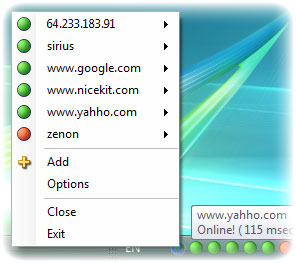
EasyNetMonitor, open popup-menu in tray and get the
information about computers network state.
On some Windows systems, the Firewall turn off the
ping protocol (Echo Request ICMP).
In this case EasyNetMonitor can not monitor this
systems. Please see
here. You can enable appropriate rules in Windows Firewall
to allow ping traffic (ICMP).

Time Boss - parental control app, that parents and kids really
love
SnapAShot - smallest free tool for taking screenshots of different size
SnapAShot - smallest free tool for taking screenshots of different size
Free network monitor - monitoring software EasyNetMonitor
EasyNetMonitor
Features
- EasyNetMonitor is the easiest and quickest way to get information on-line about computers in your local network!
- You don't need to install it from portable archive, just download and use free network monitor EasyNetMonitor anywhere
- EasyNetMonitor is only 300 Kb (only one file)
- You can monitor any internet host
- Email notifications (your computer name should be in English letters only!)
- Sound notifications
- Event log
- EasyNetMonitor is free
EasyNetMonitor Pro

Features
- All EasyNetMonitor features are included
- Actions
- Ping, HTTP options
- Improved email notifications. Personal email body and subject for each host
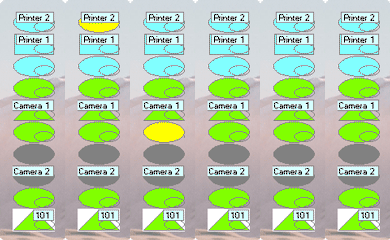
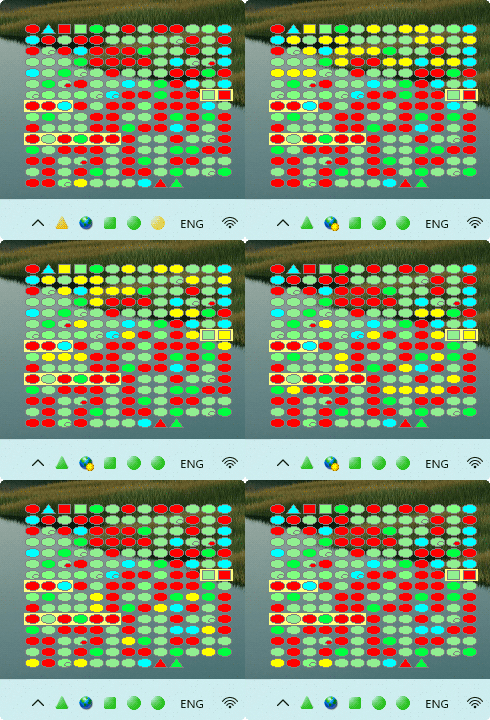
- Desktop indicator
- Event log viewer
- UTC date/time (optional), custom field separators in the event log
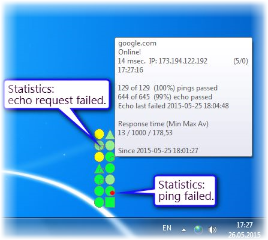
- Statistics for each host
- Test (emulator) and new configuration autoload modes
- Localization
- EasyNetMonitorPro is only one file (300 Kb)
EasyNetMonitor SE
Features
- All EasyNetMonitor and EasyNetMonitor Pro features are included
- It is Windows service version of EasyNetMonitor Pro
Some of our Customers




















EasyNetMonitor (Pro, SE) system requirements
⛛
You should have
Microsoft .NET 4.71
installed (Windows 11, 10 already have it). EasyNetMonitor
(Pro) does not require administrator rights to install.
EasyNetMonitor SE is the Windows service version of
EasyNetMonitor Pro. Config file (enm_config.txt) is
compatible for all versions of EasyNetMonitor.
All our programs have our NiceKit digital signature, but this signature is not verified by Microsoft.
So you can see the warning "Unknown Publisher" when installation of our program starts.
Please select "More Info" and then "Run Anyway" buttons on the Windows SmartScreen protection panel, if the panel appears. We guarantee the absence of malicious code in our programs!
All our programs have our NiceKit digital signature, but this signature is not verified by Microsoft.
So you can see the warning "Unknown Publisher" when installation of our program starts.
Please select "More Info" and then "Run Anyway" buttons on the Windows SmartScreen protection panel, if the panel appears. We guarantee the absence of malicious code in our programs!


Before installation, you can check the downloaded file with the built-in Windows antivirus. To do this, right-click on the file and select "Scan with Microsoft Defender ..." in the drop-down menu.
EasyNetMonitor FAQ
⛛
- Is it possible to start the network monitor from FLASH drive?
- How do I use it?
- How does it work?
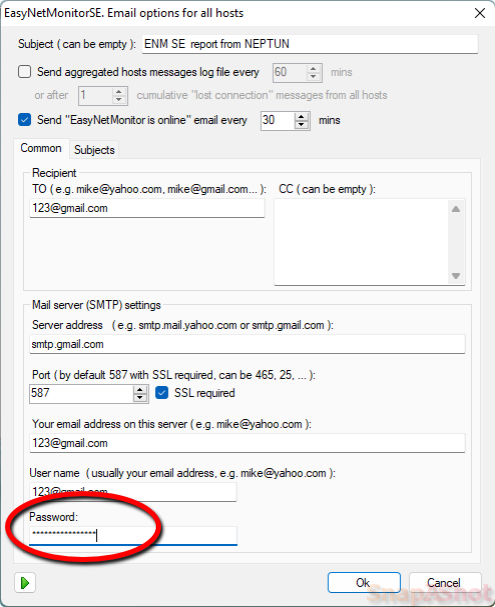
- How to set email options?
- Is there any possibility to add multiple email addresses for alerting in the case of failures?
- How many maximum IP's that we can monitor from this software?
- The config file (enm_config.txt) is compatible for all versions of EasyNetMonitor, Pro and SE?
- Can I edit the config file manually?
-
Is there a way to mass add address? I can see what
need to be set it in the config file, can I set my
own
? Something like [1] [2] etc? - Do I have to deinstall the program, if I use portable version?
- What to do if you see "Error at initialization of the address (0*с0000135). For Close press ОК..."?
EasyNetMonitor Pro (SE) FAQ
⛛
- Is it possible to start the EasyNetMonitor Pro from FLASH drive?
- How to determine that access to the website via HTTPS does not work, although it works via HTTP?
- How change the size of indicator?
- What is the group filed?
- What is the name of Windows service of EasyNetMonitor SE?
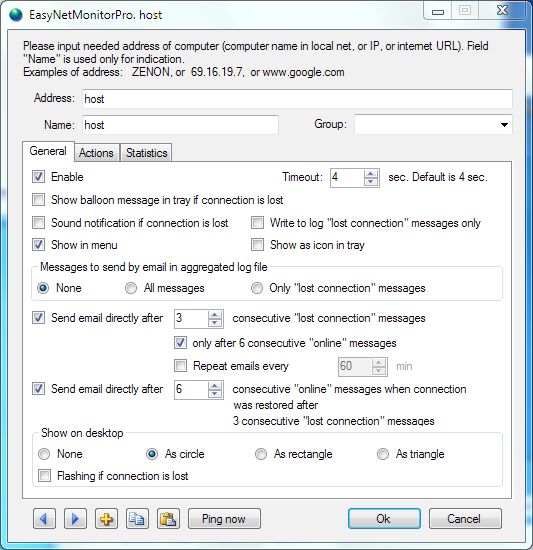
- Which should be settings of host if we would like to send an email after 3 consecutive "lost connection messages", and then send an email, when the host is available again, but only after its status is "stable" (after 6 "online" messages)?
- When I get a failed ping is it possible to limit the number of emails sent? For example if the ping fails can I just send 1 or 2 email notifications until the status changes to online no matter how long the item is offline for?
- What is the test (emulator) mode?
- How to automatically load the new configuration?
- Why are the menu icons not showing?
Answers
EasyNetMonitor
-
Is it possible to start the network monitor from
FLASH drive?
Yes. Copy the EasyNetMonitor.exe file to the FLASH drive and start it. No installation needed.
By default EasyNetMonitor.exe uses the config file (enm_config.txt) from the folder C:\ Users\ USER\ Documents\ EasyNetMonitor.
But if in the EasyNetMonitor.exe folder there is the config file (enm_config.txt) then this file will be used in any case.
If you define the 'Log' as the event log folder in the Options window (in the enm_config.txt) then will be used the folder 'Log' in the EasyNetMonitor.exe folder as the event log folder.
You can use '..\Log' notation for event log folder if needed. -
How do I use it?
Run program, open popup menu and add address of needed remote PC or internet host.
The new icon with this address will be added in EasyNetMonitor popup menu.
This icon will be green if the PC with this address is reachable across a network, otherwise the icon will be red. -
How does it work?
EasyNetMonitor works by sending “echo request” or "HTTP protocol (HEAD,GET,POST) request" packets to the target PC and listening for “response” replies. Program uses ping (ICMP) tool built-in Windows system or HTTP request.
If needed add EasyNetMonitor in the list of trusted (excluded) programs in Windows Firewall and Antivirus on your PC.
Some Windows systems have disabled ping (ICMP) protocol. In this case EasyNetMonitor can not monitor this systems. Please see here. -
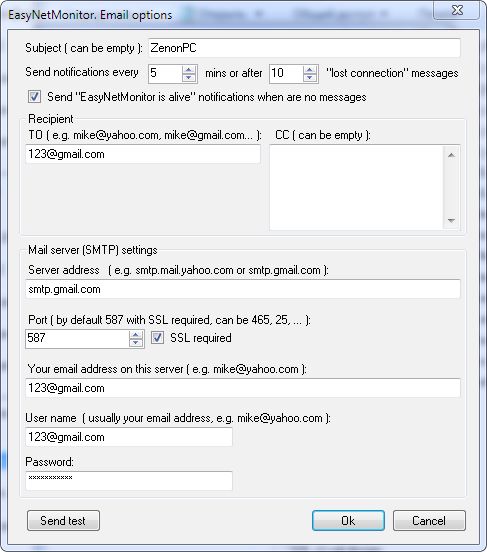
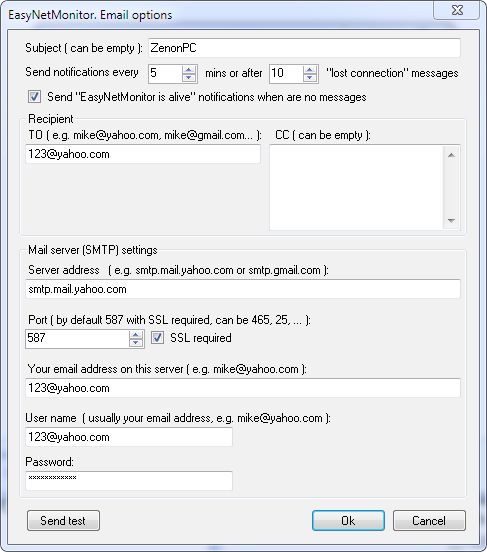
How to set email options?
Please set the 25 Port without SSL to use your corporate email server.
If you want to send email notifications using gmail.com see here, if you use yahoo.com - see here.
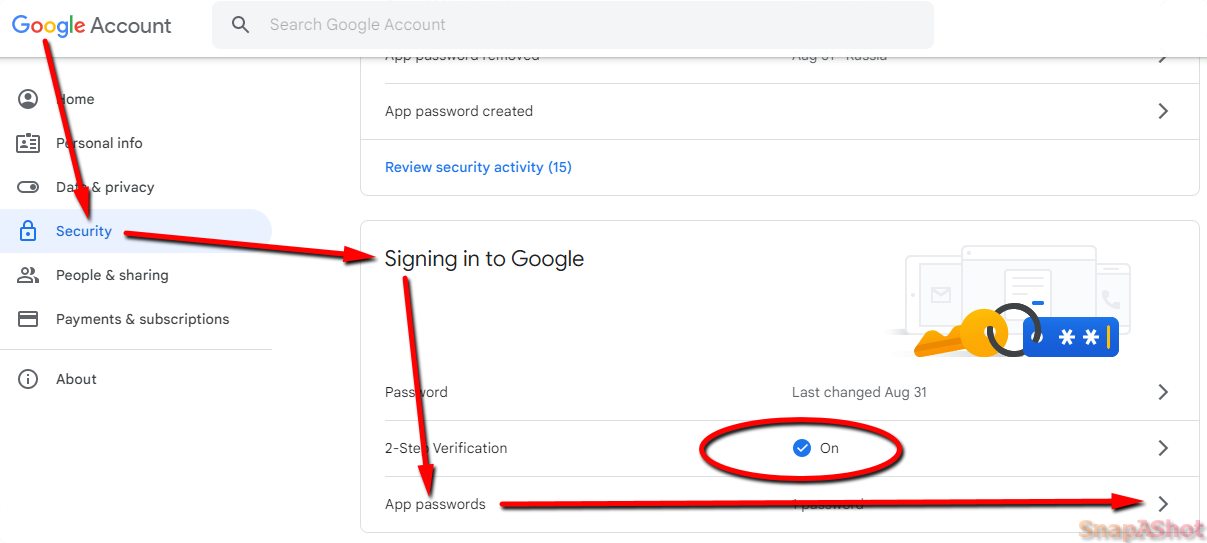
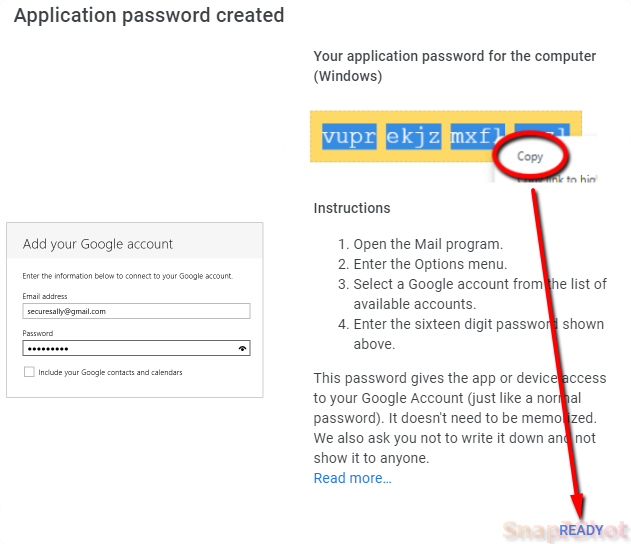
If you use the smtp.gmail.com and receive the error messaage "The SMTP server requires a secure connection or the client was not authenticated..." then create the application password in Google account and use it in EasyNetMonitor.
It's simple.
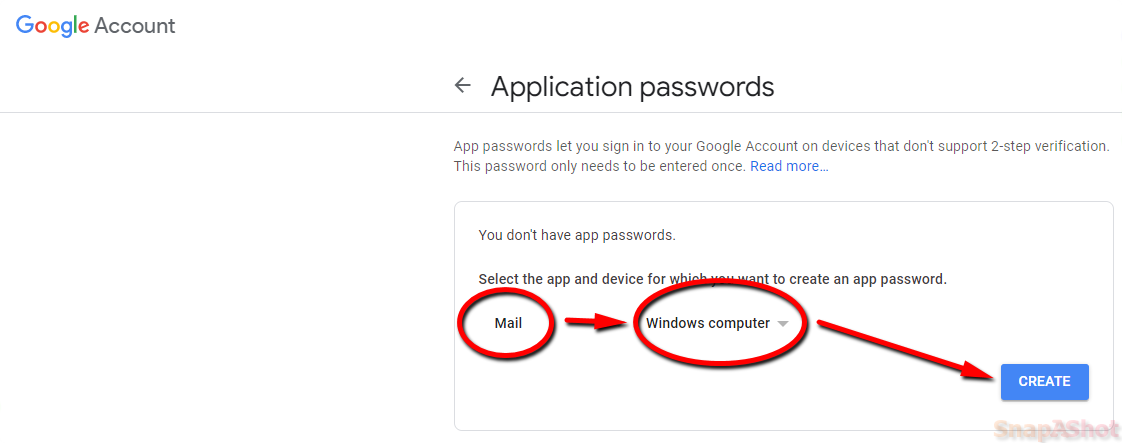
After signing in to your Google account in your browser, enable 2-Step Verification, then go to Google account->Security->Signing in to Google->App Passwords->Select app(Mail) and device(Windows computer) and press Generate.
Copy the generated 16-digit code from the yellow bar and paste it as a password in your EasyNetMonitor email settings.
Please see here, here, here, here.
More info is here.
Emails fails, what can be the problem?
Please see the log file - there are error messages in it if email fails.
Please check:
Firewall settings - may be FW blocks ENM.
Antivirus settings - may be antivirus blocks ENM.
Please note - the name of PC should be in english!
-
Is there any possibility to add multiple email
addresses for alerting in the case of failures?
Yes, you can use several email addresses (use CC box in email options).
-
How many maximum IP's that we can monitor from this
software?
In EasyNetMonitor you can use only 10 hosts.
EasyNetMonitor RPO and SE do not have hosts limit. -
The config file (enm_config.txt) is compatible for
all versions of EasyNetMonitor, Pro and SE?
Yes, of course.
-
Can I edit the config file manually?
Yes, of course. The program (service) should be stopped in this time.
-
Is there a way to mass add address? I can see what
need to be set it in the config file, can I set my
own
? Something like [1][2] etc?
Yes, of course, but this ID's should be unique.
[ID_IS_ANY_UNIQUE_STRING]
TABLE=T_MAIN
ADDRESS=google.com
NAME=google website
Each host should always have these four lines in the configuration file, others lines in section of the host are not mandatory. -
Do I have to deinstall the program, if I use
portable version?
No, simply remove the program file of network monitor.
-
What to do if you see "Error at initialization of
the address (0*с0000135). For Close press ОК..."?
Such message appears when th Microsoft .NET 4.0 package isn't installed on PC.
EasyNetMonitor Pro (SE)
-
Is it possible to start EasyNetMonitor Pro from
FLASH drive?
Yes. Copy the EasyNetMonitorPro.exe file to the FLASH drive and start it. No installation needed.
By default EasyNetMonitorPro.exe uses the config file (enm_config.txt) from the folder C:\ Users\ USER\ Documents\ EasyNetMonitor.
But if in the EasyNetMonitorPro.exe folder there is the config file (enm_config.txt) then this file will be used in any case.
If you define the 'Log' as the event log folder in the Options window (in the enm_config.txt) then will be used the folder 'Log' in the EasyNetMonitorPro.exe folder as the event log folder.
You can use '..\Log' notation for the event log folder if needed. -
How to determine that access to the website via
HTTPS does not work, although it works via HTTP?
Add two hosts, one with https and one with http access. Example: https://nicekit.com and http://nicekit.com. Then select the HEAD http protocol method as the request type for each host.
-
How change the size of indicator?
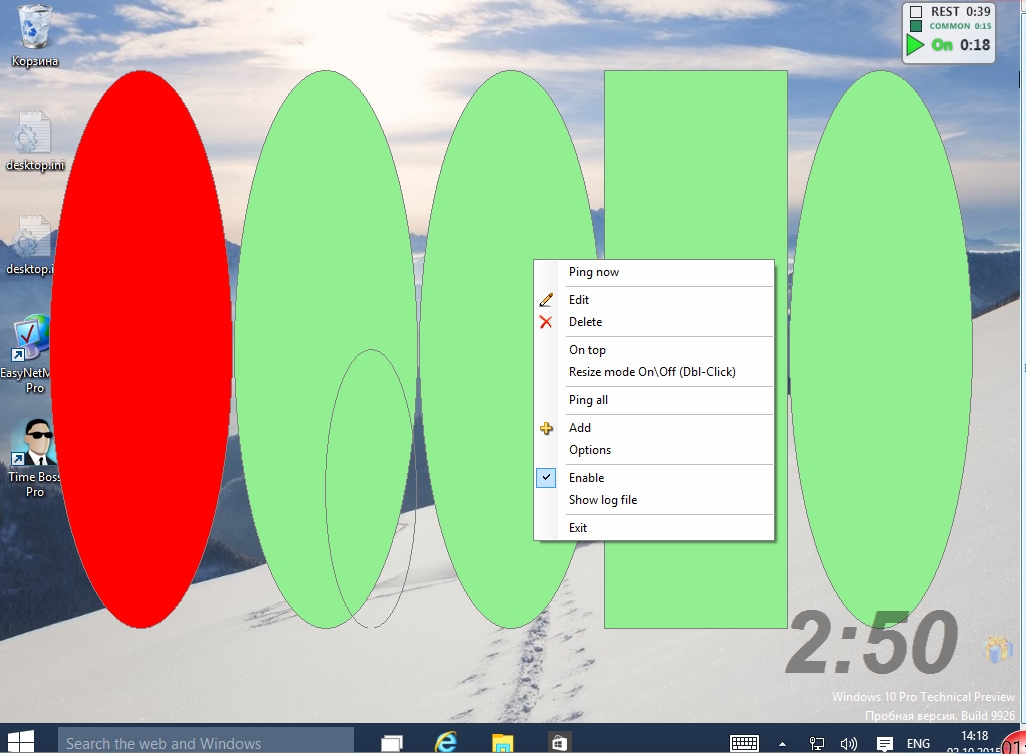
Please use Resize mode (On\Off) item in the popup menu (right mouse click) of indicator. Please see the picture.
-
What is the group filed?
Using group you can:
1. add top level item in the main menu that contains all hosts from this group
2. change the order of hosts in the desktop indicator (the sorting rule: string=group+name) -
What is the name of Windows service of
EasyNetMonitor SE?
The service name is EasyNetMonitorSrv.
-
Which should be settings of host if we would like
to send an email after 3 consecutive "lost
connection messages", and then send an email, when
the host is available again, but only after its
status is "stable" (after 6 "online" messages)?
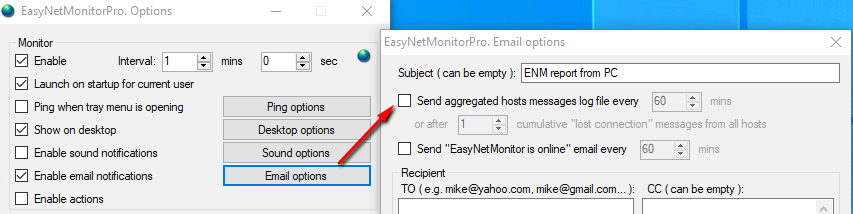
Please see here. Also you should disable sending the aggregated email log file if needed, see here.
You can use the the emulator mode in ENM for testing. Emails will be not send and will appear in "Emulator" window only. Create the simple txt file in ENM folder: enm_emu_offline_list.txt.
If your host will be in start of some line of the text in this file - so ENM get "lost connection" message after ping for this host.
For testing is useful to disable ENM monitor on some time and send pings from "Ping now" window for this host only.The settings in "Options->Email options" window are active for all hosts. If this options are active so will be send log file with info from all hosts. You can not use this options in your case.
-
When I get a failed ping is it possible to limit
the number of emails sent? For example if the ping
fails can I just send 1 or 2 email notifications
until the status changes to online no matter how
long the item is offline for?
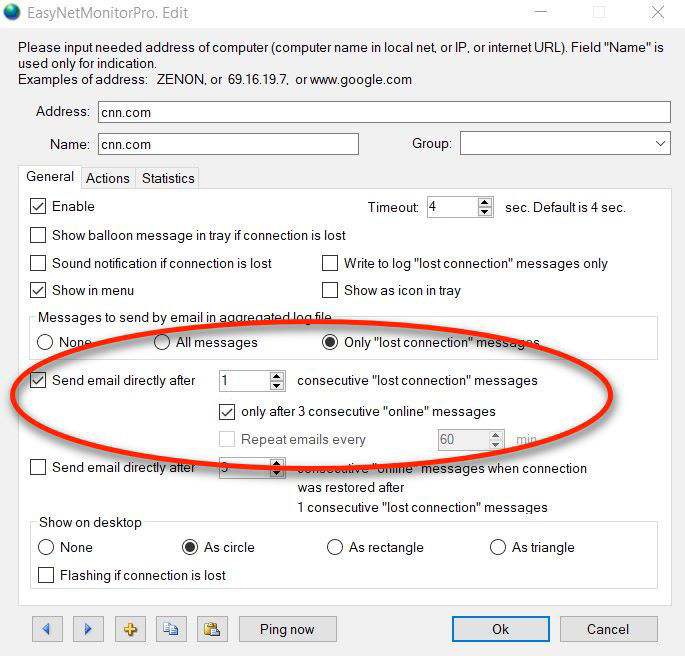
Yes. Disable option "Options->Email options->Send aggregated hosts messages...." and activate options "Send email directly after..." and "only after 3 consecutive online messages" for needed host. See here.
-
What is the test (emulator) mode?
This is a test mode for configuring notifications, e-mail messages and actions. Mode is activated if the text file enm_emu_offline_list.txt exists in the program folder. In this mode, the service (or EasyNetMonitor Pro) stops sending the real ping command to all hosts and gets information about "lost connection" hosts from this file. Addresses of this hosts are listed at the beginning of the lines in this file. All other hosts are "online".
In this mode, the actual e-mails will be not sent and actions will be not started. However, the information that the email should send and the action should run appears in the emulator message box. This emulator message box opens automatically.
The addresses in the file should be at the beginning of the line.
For example:
google.com
cnn.com
vk.com
This means that hosts google.com, cnn.com, vk.com are "lost connection".
If the address is not in the beginning of the line, that it is "online".
For example:
google.com
..cnn.com
//vk.com
Hosts cnn.com and vk.com are "online". But there is no connection to google.com.
You can open the file enm_emu_offline_list.txt in the text editor (Notepad), make changes and click "Save file" without closing the editor. If the program is installed in the Program Files, then run editor (Notepad) with administrator rights please.
Please rename or delete this file to stop test (emulator) mode.
It is not necessary to restart the service EasyNetMonitorSrv in EasyNetMonitor SE. -
How to automatically load the new configuration?
The new configuration will be load automatically in 10 sec from the file enm_config_auto.txt. After loading this file will be deleted. Use AUTO_IND_W and AUTO_IND_H fields to set the new size of desktop indicator. The event log will contain autoloading event.
-
Why are the menu icons not showing?
If the monitor interval is less than 30 seconds, then the host status icons are not shown, as this leads to unpleasant menu blinking.